Showing posts with label Technology. Show all posts

Thursday, April 24, 2014

I Love Spreadsheets

It's been an awfully long time since I updated! I know I didn't finish my 30 Days Without Make Up, but who wants to see that anyway? I did go the full 30 with no make up, and you know what? It didn't change my life. It didn't change my skin.

What it DID do was get me used to seeing my own face without make up and not feeing naked without it. Super plus since I no longer feel compelled to wear make up every single day. On the downside, there are some days I shove off to work with no make up on. Depending on the outfit, that can be a very bad idea. All of a sudden it's "Hey kid! Where's the teacher?" Oh, yeah...that's me.

Moving on!

This post has nothing to do with make up, but it does have to do with achieving goals and fancy spreadsheet stuffs. You heard me right: *fancy*spreadsheet*stuffs*

Due to age, pizza, and general laziness, some of my clothes are no longer fitting the way that they used to...I think it's more the pizza's fault, though. Hubby has informed me that buying a new wardrobe is NOT an option (Good! I didn't want to get rid of my clothes anyway!), so the only option left is to fit myself back into them. One problem: I SUCK at diets and fitness in general.

I've been blessed with a high metabolism and watching what I eat has never been an issue (commence throwing tomatoes in 3, 2,...). It seems that now my body is catching up to my metabolism and it turns out that I CAN'T eat junk food for days on end and still fit into my favorite skinny jeans. Did I mention that I'm lazy? Unless I'm being dragged to the gym (like the three months before I got married), working out is not on the top of my To-Do list. I would rather do laundry than work out. I don't know, but even with a TV or good music...I still get bored.

ENTER THE SPREADSHEET!!

I've been reading a lot about Gamification in both the classroom and the workplace. The general idea is this: earn points for doing the stuff you should be doing, earn more points for bonus stuff, and "Level Up" when you hit a goal of however many points.

I'm still working on doing this for my students, but this is what I have done for myself:

 I made this spreadsheet in Google Drive using the same basic principles in any spreadsheet software. I formatted the cells to look like a calendar, allotting two additional cells under each date. The topmost cell is reserved for the points that I earn that day for working out (see the yellow box on the right of the spreadsheet). The bottom cell for each date is where I can write notes about what I ate or how much I weighed.

The green cells are where it gets fun. This is my running total. The bottom part of the green cells is a formula that calculates the sum of all of the "point" cells from each date. Formulas in Google Drive work exactly the same way that they do in Excel or Open Office.

At this point you may be thinking "Hey! I don't see a bottom green cell! Only a green and a RED cell!" This is where the *FANCY* comes in. Like other spreadsheet software, Google Drive lets you conditionally format a cell or series of cells. In English: If the cells contains (insert whatever number, letter, or word you want), then the cell will (insert what you want it to do when said condition is met). Okay...maybe that wasn't Englishy enough....so here's what it does:

As long as the number in the bottom of my "Running Total" is less the 60, then the cell will stay red. Once I have met or exceeded my goal (of 60 points), the cell will turn green. *FANCY*SPREADSHEET*STUFFS*

Now that my spreadsheet is all set up, all I have to do is put in the point value for however long I exercised (usually time on the elliptical in my garage). 1 point is equal to 30 minutes of exercise. I chose 30 minutes because that's what I thought I could realistically do on a daily basis. I chose 1 point because I like to keep things simple. If you like to see big numbers, make your 30 minutes and hour and make each hour worth 60 points. <-- Ooooh! Then each minute could be one point and you can add small increments of time! Just make sure you change your goal total accordingly.

Other than being a Google Nut, I specifically chose to make this spreadsheet in Google Drive for one reason: CONVENIENCE. Putting the spreadsheet in Google Drive means that I can access and edit it from ANYWHERE! On my phone, on my laptop, on my tablet, on my mom's computer, on my husband's phone, on my brother's Android. As long as there is an internet connection and an up-to-date browser, I can view and edit my sheet. Remember: I'm LAZY. I use Google Drive for everything else anyway, so putting my fitness tracker in there makes it easy to access.

If you would like to view my spreadsheet and make a copy to use for yourself (either save a copy to your own Google Drive or download it to a spreadsheet software of your choice), you can click the link here. Don't worry about messing up mine, since it's set to "View Only."

Saturday, August 27, 2011

Favorite Gadgets


I'm a gadget type of gal. If it plugs in and lights up, I want it. If it stores or uploads, I need it. If it plays music or video, I already have it. So, here are my favorite gadgets that I have acquired in 2011:


1) Magic Wand portable scanner
 I should have bought stock in this company. Since finding it while checking out from Office Depot and buying it on a whim (half thinking it was too good to be true), I have convinced several of my friends and family to buy one as well. It's a PORTABLE SCANNER, people! Push the button, roll over whatever you want to scan, and it's saved as a jpeg to a memory card. The resolution is great, possibly even better than my HP desktop scanner. This will scan any flat surface. I've even used it to scan the arm of a student who decided that drawing a "tattoo" on his arm was a better use of his time than Algebra. Use it to scan walls, floors, tables, blankets, binders, whatever you want! And the best part? It only cost $99.

2) iPad
What can I say? It's a larger version of my iPhone, to which I already have a severe addiction. My love affair with this device began when I learned I could access my district grade book on it and enter scores. As a teacher, this is a miracle! I can now walk around the room and enter grades on the fly that will immediately be applied to students' permanent grades. No more manual recording and then entering them on the computer at home. This is going increase my productivity by 1,000,000%. I said "I Do" to the iPad when I learned how to use it with Apple TV. The latest version of iOS enables a feature called AirPlay. AirPlay allows you to stream music and video from any iOS device to the nearest AppleTV completely wire free. For me, this means that my favorite DVDs won't become scratched and worn from use because I can play them digitally from my iPad; "Dawn of the Dead" and "Rocky Horror" can rest safely in their cases, now. 
Cost: $599 {but mine was a hand-me-down from hubby}

3) Apple TV
AirPlay is what turned me on to AppleTV, and I would have been happy if that was all AppleTV did. However, AppleTV does more than just play the audio and video files from my iPad and iPhone wirelessly. AppleTV also connects wireless to the iTunes library on the computer of your choice. Just connect with the Apple ID of your chosen library (connect wirelessly on your wifi network) and all your music, movies, and TV shows are now on your TV. No more hunching over my laptop to watch my shows! Furthermore, AppleTV also offers all of the video amenities of the iTunes store; you can both rent and buy movies that are available through iTunes. AppleTV also lets you connect to YouTube and view videos on your full sized TV. 
Cost: $99

4) Mac Mini
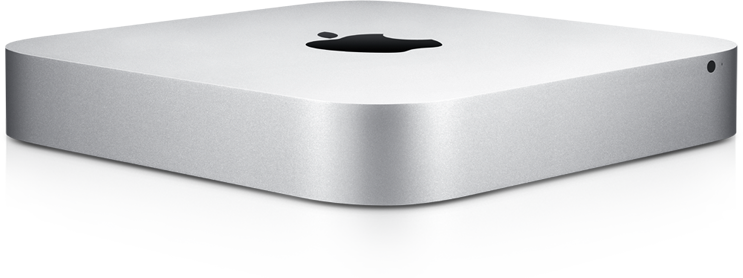
After a month of enjoying the bliss of AppleTV, my husband and I began to get greedy. Why must my laptop be on and dedicated to iTuned whenever I use AppleTV? What if the movie I want to watch is on hubby's computer and not mine? What if I want to do other activities on my laptop WHILE I'm watching AppleTV? Well, the solution to this seemed obvious: get a third Mac that will always be on and will be dedicated to storing all of our movies and TV shows. Unfortunately, we didn't have the kind of finances to purchase a shiny new iMac. So, we opted for the next best thing: a Mac Mini. A Mac Mini is just the hard drive of a Mac (Think a Mac, minus the screen). A Mac Mini is significantly less that a new iMac and all you need is a screen to plug it into. So, we bought a Mac Mini and plugged it into our TV upstairs (a lovely 42 inch Vizio). This effectively turned our bedroom TV into a giant Mac, and it is GLORIOUS. Not only does this supplement our AppleTV needs, but this also gives us internet access in our bedroom without having to cart a laptop up and downstairs.
Cost: $599

5) Heated eye-lash curler
My eyelashes are Japanese, e.g., they point down. So even though they aren't thin, per se, they aren't very visible because they aren't being contrasted with my eyelids. Traditional eyelash curlers pinch and have to be used before the application of mascara (lest your eyelashes stick to the mechanism and rip off). This heated eyelash curler by Japonesque uses a small heated coil to put your eyelashes in place. It's used after the application of mascara and works especially well with water proof mascaras. Water proof mascaras dry more quickly and contain wax. Reheating this formula during curling results in a more dynamic and stable curl that lasts longer. It also takes up a whole lot LESS space in storage! Runs on one AAA battery.
Cost: $19.99

6) MoTevo In-Dash Navigation/Entertainment System
I didn't blog or FaceBook about it, but I got a new car last April from my extremely generous Grandparents, who decided that they didn't need two cars anymore {which made me a little sad}. So, for my birthday, hubby had this system installed for me. I love it. I have my GPS always ready to go when I get lost and I don't have to fiddle with charging it and turning it on. There is an iPod connector, but I can also play my phone wirelessly through the stereo vis Bluetooth. It also has a Bluetooth phone connection for calls. If this thing could talk to me and give me advice, I would have to rename my car KITT.
Cost: $600


7) Soda Stream Soda Machine
I could tell you about how "green" I'm being by making my own soda, in reusable bottles, and about how much more economical it is to make generic soda instead of buying name brands...but in all honesty, I just think this thing is way cool. It's basically a big CO2 gun that shoots CO2 into water. I'll tell you one thing it's really good for: cravings. Sometimes I get these cravings for orange or grape soda, but I don't want to commit to a whole liter or a six pack. With the soda stream, I can make a bottle of whatever I'm craving and not feel guilty if I pour half of it down the drain because I've still got  a ton of syrup left. Not to mention the potential to experiment with new flavors and mixes. Caramel Soda anyone?